microsoft office shortcut keys , microsoft office shortcut keys pdf,microsoft office 2010 shortcut keys ,microsoft office excel 2010 shortcut keys pdf free download ,microsoft office excel 2010 shortcut keys , ms office shortcut keys pdf 2007

  • Ctrl+W. Close the active window / document.
  • Ctrl+Z.  Undo an action.
  • Ctrl+Y. Redo the last action or repeat an action.
  • Ctrl+S. Save a document.
  • Ctrl+P. Print a document.
  • Ctrl+K. Insert a hyperlink.
  • Alt+Left. Arrow Go back one page.
  • Alt+Right. Arrow Go forward one page.
  • Ctrl+C. Copy selected text or graphics to the Office Clipboard.
  • Ctrl+V. Paste the most recent addition to the Office Clipboard.
  • Ctrl+Shift+A. Format all letters as capitals.
  • Ctrl+B. Applies or removes bold formatting.
  • Ctrl+I. Applies or removes italic formatting.
  • Ctrl+=. Apply subscript formatting (automatic spacing).
  • Alt, F, A. Save As.
  • Alt, S, T, I. Insert Table of Contents.
  • Alt, S, T, R. Remove Table of Contents.
  • Alt, W, F. Full Screen Reading – View > Document Views > Full Screen Reading.
  • Alt, W, R. Ruler. View > Show/Hide > Ruler.
  • Alt, F, X. Exit Word.
Download microsoft office shortcut keys file  


Read More »

Rank Youtube Video! YouTube Videos on the First Page of YouTube and Google


  1. Video Creation.
  2. Video Length (Tip : 20 minute long videos rank the best).
  3. Video High Definition.
  4. Add Audio To Your Video.
  5. Call-To-Action ( Simply ask viewers to subscribe if they liked your video)
  6. Custom thumbnail .
  7. Metadata :                                                                                                                                              (Before uploading your video, you should take the time to add relevant metadata to the file. Right-click the file and add a title, small description containing your keywords, and a few tags)
  8. Title:                                                                                                                                            Contain your keyword at the very beginning, and possibly a second time at the end
  9. Description:                                                                                                                               The first paragraph of your description should be a brief overview of what your video is about. Again, it should contain your keyword near the beginning, and again further in.
  10. Tags :                                                                                                                                                  Put main keyword in tags and related also add your channel name .
  11. Long-Tail Keyword
  12. Low-Competition Keyword
  13. How To Show Up On Competitors Videos:                                                                                  Here’s a simple trick to show up as suggested on competitors videos. Add their channel name to your tags. Simple                                                                                                                                            Here’s a quick example, I’m trying to rank a video about "ABC". A channel called “XYZ” ranks well for this keyword (clearly). I want to show up at the end of their videos, so I add the phrase “XYZ” to my videos tags and… BOOM, there I am. What did I tell you? Simple!
  14. Annotations and Transcripts
  15. Backlinks:
  16. Social Sharing
  17. Articles

Read More »

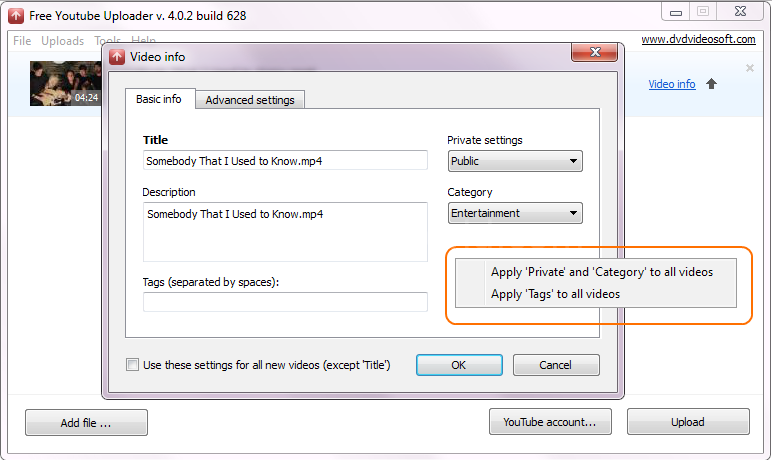
Download Free YouTube Uploade.

The youtube uploader helps user to upload multiple videos on YouTube at the same the  time without changing your browser settings on that time.
Download Free YouTube Uploader Now 
icw.dvdvideosoft.net/FreeYouTubeUploader.exe


Read More »

I've been utilizing SDI as a component of my business for a little time. The program is a gigantic help and it "just works". The designer put out a demand for individuals to assist with the venture. 


I had some time staring me in the face so I began investigating assisting. I'm not a C++ developer so my potential was fairly restricted. In any case, I joined the SDI group in late 2016 as a contributing designer and buildmaster.A couple of months after the fact, the venture was given over to other individuals with whom I am not recognizable. These "other" individuals began doing their own informal forms and embeddings adware, secondary passages and shrouded outsider programming establishments and posting these dodgy expands on the official site over which I have no control. 

Snappy Driver Installer Origin R554 Download Free


Read More »

Professional eye-candy ranking and traffic reports:
  • Competition rankings report
  • Keyword rankings and visibility report
  • Keyword rankings report (by keyword)
  • Keyword research report
  • Keyword rankings report (by search engine)
  • Website visitors (traffic) report
It is available for you, both the professional editions & enterprise edition in free. This freeware version has also come with very few limitations too, but you can easily use it till you need, without any paying of money. This software is made for Microsoft Windows, also for Mac OS, and also for the Linux Operating System.

Rank Tracker To Track Your Search Engine Rankings Download Free


If Above Link Is Not Working .Use Bellow Link To Download File

Read More »

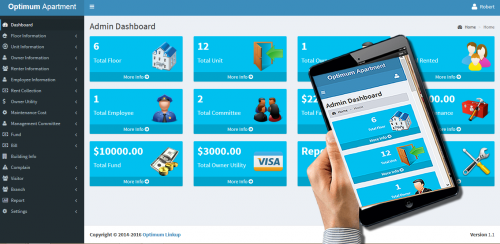
Responsive Apartment Management System In PHP


HOW TO INSTALL :
  1. extract the folder - ams.zip
  2. copy and paste ams folder to your root directory
  3. open the ams folder and locate ams_db.sql and open it
  4. create database name (ams_db) in your local server using wamp server or xamp or mamp
  5. click on sql, and paste all the text inside ams_db.sql
  6. click on go
  7. finally go to your browser to run the software - http://127.0.0.1/ams/index.php
LOGIN DETAILS :
Super Admin ricky@yahoo.com 123456
Admin devsolver@gmail.com 654321
Owner mark@yahoo.com 123456
Employee jhonson@yahoo.com 123456
Renter ricky@yahoo.com 123456

Read More »

Wondershare Filmora (originally Wondershare Video Editor) allows you to change voice of video/audio and recorded voiceover. You can also click "Import" on the primary windows to import video/audio files to the User's Album, or click  voice over button above Timeline to record your own voice in. The imported video/audio files could then be added to the Timeline for editing, while the recorded audio would automatically appear on Audio track.

                   Download Filmora Video Voic Changer For Windows


Download Filmora Video Voic Changer For Mac 


Read More »

HANDOUTS / POWER POINT SLIDES

Fundamentals of Computer (Notes -- 16 Chapters) (Introduction to Computing)
Lessons (1-45) (pdf format) (Introduction to Computing)
Power Point Slides (1-45) (Introduction to Computing)

LECTURES (VIDEO/AUDIO/DOWNLOAD)


Read More »


HANDOUTS / POWER POINT SLIDES

COURSE CONTENTS

Introduction to Training Environment & Computing.Input Devices And Output Devices.Storage. Hardware,Software.Internet Desktop. Organizing Files.Introduction to Text Editing.. Security.Computer Environment. System Properties.Working with Text Editor.Closing an Application.Saving files on Floppy,Print Management.Text formatting.Tables.Mail Merge,Preparing Output.Basic concepts of MS Excel.Basic concepts of word processing,Introduction of MS word.Introduction of Excel Sheets.Working with Cells.Worksheets.Formulas and Functions.Formatting.Charts and Graphs.Developing a Presentation.Prepare Output.Advance Topics.Introduction of Power Point.Formatting.Charts and Objects.Animations.Printing a Presentation.Internet.Web Navigation.Search Engines.Email.Messaging.Mail Management.

Lessons (1-45) (pdf format) (CPL Book)


RELEVANT MATERIAL

How to Create any Type of Drawing in MS Word


Read More »


Lecture No 1

The human ?

•Information i/o …
  –visual, auditory, haptic, movement
•Information stored in memory
  –sensory, short-term, long-term
•Information processed and applied
  –reasoning, problem solving, skill, error
•Emotion influences human capabilities
•Each person is different

Lecture No 2

The computer ?

a computer system is made up of various elements

each of these elements affects the interaction
–input devices – text entry and pointing
–output devices – screen (small&large), digital paper
–virtual reality – special interaction and display devices
–physical interaction – e.g. sound, haptic, bio-sensing
–paper – as output (print) and input (scan)
–memory – RAM & permanent media, capacity & access
–processing – speed of processing, networks


Lecture No 3

The Interaction In HCI ?
•interaction models
–translations between user and system
•ergonomics
–physical characteristics of interaction
•interaction styles
–the nature of user/system dialog
•context
–social, organizational, motivational

Lecture No 5

Interaction design basics in Human computer interaction 
•design:
–what it is, interventions, goals, constraints
•the design process
–what happens when
•users
–who they are, what they are like …
•scenarios
–rich stories of design
•navigation
–finding your way around a system
•iteration and prototypes
–never get it right first time!

Lecture No 6

HCI in the software process ?
•Software engineering and the design process for interactive systems
•Usability engineering
•Iterative design and prototyping
•Design rationale


Lecture No 7

Design rules In HCI ?
Designing for maximum usability
  – the goal of interaction design
•Principles of usability
–general understanding
•Standards and guidelines
–direction for design
•Design patterns
–capture and reuse design knowledge

Lecture No 9

Evaluation Techniques IN HCI ?
•Evaluation
–tests usability and functionality of system
–occurs in laboratory, field and/or in collaboration with users
–evaluates both design and implementation
–should be considered at all stages in the design life cycle


Lecture No 10

universal design principles IN HCI ?

•equitable use
•flexibility in use
•simple and intuitive to use
•perceptible information
•tolerance for error
•low physical effort
•size and space for approach and use


Lecture No 11

user support In HCI ? 

•Issues 
–different types of support at different times
–implementation and presentation both important
–all need careful design
•Types of user support –quick reference, task specific help, full explanation, tutorial 

•Provided by help and documentation
–help - problem-oriented and specific
–documentation - system-oriented and general
–same design principles apply to both


Lecture No 12

Cognitive models In HCI ?
•goal and task hierarchies
•linguistic
•physical and device
•architectural


Read More »


What is Intelligence?

This problem can be considered as a common real life problem which we deal with many times in our life, i.e. finding a path, may be to a university, to a friends house, to a market, or in this case to the piece of cheese. The mouse tries various paths as shown by arrows and can reach the cheese by more than one path. In other words the mouse can find more than one solutions to this problem. The mouse was intelligent enough to find a solution to the problem at hand. Hence the ability of problem solving demonstrates intelligence.

Download Artificial Intelligence Handouts


Download Artificial Intelligence  Book By George F LUger


Read More »

Lecture No 1

What is wireless communication?

WC is a standout amongst the most energetic territories of correspondence field today. While it has been a point of study since 1960s yet the most recent decade has seen a surge of research exercises around there. This is because of impact of a few elements 

To begin with there has been a touchy increment sought after of tetherless availability,essentially by cell communication however expected by remote information applications. 

Second the sensational advance in VLSI innovation has empowered execution of proficient flag preparing calculations and coding methods.


Lecture No 1.1

Electromagnetic Signal:-

  1. is a function of time 
  2. can also be expressed as a function of frequency 
  3. Signal consists of components of different frequencies

Lecture No 2 

What Is Attenuation?

1)Attenuation means loss of energy
2)Some of electrical energy is converted to heat


Lecture No 3

What is Multiplexing?

Multiplexing Set of techniques that allows the simultaneous transmission of multiple signals across a single data link.


Lecture No 4

Types of Errors:-

What is Single-Bit Error?

Only one bit of a given data unit is changed

What is Burst Error?

1)Two or more bits in the data unit are changed
2)Most likely to happen in a serial transmission

What is Redundancy Error?

Redundancy means adding extra bits for detecting errors at the destination


Lecture No 4.1

Longitudinal Redundancy Check


Lecture No 4.2

Modulo-2 Division in a CRC Generator

Lecture No 5

Radio Frequency Allocation


Download Wireless Communications & Networks Book By William Stallings


Read More »


Lecture No 1:-


What is Systems Programming?


PC programming can be classified into two classifications .i.e. 

While planning programming the developer may decide the required contributions for that program, the needed yields and the preparing the product would perform keeping in mind the end goal to give those needed yields. The execution of the preparing part is connected with application programming. Application programming encourages the execution of the required preparing that product should perform; everything that is left now is encouraged by framework programming. 


Lecture No 2:-

Interrupt Mechanism:-

Interrupt follow a follow a certain mechanism for their invocation just like near or far procedures. To understand this mechanism we need to understand its differences with procedure calls.

Difference between interrupt and procedure calls 


Procedures or functions of sub-routines in various different languages are called by different methods as can be seen in the examples.

• Call MyProc 
• A= Addition(4,5);
• Printf(“hello world”);

The general idea for system bring in the vast majority of the programming dialects is that on conjuring of the methodology the parameter list and the arrival address (which is the esteem if IP enroll if there should arise an occurrence of close or the estimation of CS and IP enlists in the event of far technique) is pushed Moreover in different programming dialects at whatever point a strategy is called its deliver should be indicated by some documentation i.e. in C dialect the name of the strategy is determined to call a methodology which adequately can be utilized as its address.


Lecture No 3:-

Use of ISRs for C Library functions
There are various library function that a programmer would typically use in a program to perform input output operations. These library functions perform trivial I/O operations like character input (putch()) and character output (getch(), getc() etc). All these function call various ISRs to perform this I/O. In BIOS and DOS documentation number of services can be found that lie in correspondence with some C library function in terms of its functionality.

Writing S/W ISRs
Lets now see how can a programmer write an ISR routine and what needs to be done in order make the service work properly. To exhibit this we will make use of an interrupt which is not used by DOS or BIOS so that our experiment does not put any interference to the normal functions of DOS and BIOS. One such interrupt is interrupt # 65H. The vector of int 65H is typically filled with zeros another indication that it is not being used.

Getting interrupt vector
As we have talked about before IVT is a table containing 4 byte sections each of which is a far address of an interfere with administration schedule. Every one of the vectors are organized serially with the end goal that the intrude on number can be utilized as a file into the IVT. 

Getting interfere with vector alludes to the operation which used to perusing the far address put away inside the vector. The vector is twofold word, the lower expression of it being the counterbalanced address and the higher word being the section address. Besides the address read from a vector can be utilized as a capacity pointer. The C library work used to do the precisely same is getvect(int#) which requires the intrude on number a parameter and returns the estimation of its vector.


Lecture No 4 :-
Interrupt stealing or interrupt hooks

This method makes utilization of the way that the vector is put away in the IVT and it can be perused and composed. The interfere with which is to be snared its (unique routine ) vector is first perused from the IVT and afterward put away in an intrude on pointer sort variable, after this the vector is changed to indicate one of the intrude on capacity (new normal) inside the program. On the off chance that the hinder is summoned now it will drive the new routine to be executed given that its memory inhabitant. Presently two things should be possible, the first routine may play out a vital undertaking so it additionally needs to conjured, it can either be summoned in the begin of the new standard or toward the end of the new routine utilizing its pointer as appeared as a part of the accompanying execution outlines beneath.


Read More »